Conditions
Conditions were added to Finit in v3 with the intention of providing a mechanism for common synchronization problems. For example:
- "wait for service A to start before starting service B", or
- "wait for basic network access to be available"
A condition is named in the conditions list of a service, task, or
run block. The list may hold several, and they are logically AND'ed
during evaluation, i.e. all conditions must be satisfied in order for a
service to run. In running text, and in initctl output, a condition
is written inside angle brackets, <pid/syslogd>.
One prefix can be used on a condition:
~-- propagate reload from this dependency, see below
The line-based format also accepts a leading ! on the list, which is
not a condition and not a negation. It is a flag on the block, and it
means two unrelated things depending on where it sits: a service does
not support SIGHUP (noreload), or a run/task should not block
runlevel changes, i.e. bootstrap. Each of those is its own key here:
| Line-based | Block format |
|---|---|
<!...> on a service or sysv |
reload-signal = "none" |
<!...> on a run or task |
required = false |
Finit guarantees by default that all run/tasks run (at least) once per runlevel. For most tasks this is a good default, for example checking SSH host keys or loading keymap. However, for conditions that are unlikely to happen it is not. (See example below.)
Example
service netd {
    description = "Network monitor"
    runlevel    = "2345"
    conditions  = { "pid/setupd", "pid/zebra" }
    command     = "/sbin/netd"
}
In this example the Network monitor daemon netd is not started until
both the pid/setupd and pid/zebra conditions are satisfied. A
pid/ condition is satisfied by the corresponding service's PID file
being created, i.e., the service's default readiness notification.
Important
Conditions also stop services when a condition is no longer asserted.
I.e., if the zebra process above stops or restarts, netd will also
stop or restart.
Another example is dropbear, it does not support SIGHUP, but we can
also see optional sourcing of arguments from an environment file:
service dropbear {
    description   = "Dropbear SSH daemon"
    runlevel      = "2345789"
    reload-signal = "none"
    envfile       = "-/etc/default/dropbear"
    command       = "dropbear -F -R $DROPBEAR_ARGS"
}
Finally, the weird "block runlevel changes" example. Here we see what
happens when Finit receives SIGPWR, sent from a power daemon like
powstatd(8). A condition is asserted and a user can set up their
own task to act on it. We do not want this task to block Finit from
moving to the next runlevel after bootstrap, so we set
required = false:
task pwrfail {
    description = "Power failure, shutting down"
    runlevel    = "S0123456789"
    conditions  = { "sys/pwr/fail" }
    required    = false
    command     = "initctl poweroff"
}
Propagating Reload in Dependencies
By default, when a service reloads during initctl reload, dependent
services are paused (SIGSTOP) and simply resumed (SIGCONT) when the
condition is reasserted. This is correct for barrier-style dependencies
like <pid/syslogd>, where dependents just need syslogd running and do
not care if it reloads its config.
For services that need to react when their upstream reloads, the ~
prefix propagates the reload from the dependency:
service svc_b {
    description = "Needs A (barrier)"
    conditions  = { "pid/svc_a" }
    command     = "/sbin/svc_b"
}

service svc_c {
    description   = "Propagate reload from B"
    conditions    = { "~pid/svc_b" }
    reload-signal = "none"
    command       = "/sbin/svc_c"
}
Here, <~pid/svc_b> means: propagate a reload of svc_b to svc_c.
When svc_b reloads, svc_c will be restarted, because of
reload-signal = "none", instead of merely resumed. If svc_c
supported SIGHUP, it would be sent SIGHUP instead.
This is similar to systemd's PropagatesReloadTo= directive, but
declared on the consumer side rather than the provider side.
Triggering
Conditions are mainly triggered (asserted) by built-in plugins, e.g.,
netlink.so: provides<net/...>pidfile.so: provides<pid/...>- Cmdline
finit.cond=arg: provides<boot/arg>
See below for built-in conditions. Finit also supports user-defined
conditions, sometimes referred to as static or one-shot conditions.
They live in the <usr/...> namespace and are constrained to a flat
hierarchy without any sub-directories, unlike the pidfile plugin, for
instance.
User-defined conditions are controlled using the initctl cond set and
initctl cond clear commands:
initctl cond set foo
initctl cond clear foo
The purpose of user-defined conditions is to be able to start or stop services, or run/task jobs, on external site-dependent stimuli.
Example:
service alarm {
    description = "Foo alarm"
    runlevel    = "2345"
    conditions  = { "usr/foo" }
    command     = "alarm --arg foo"
}
For convenience, prefixing with usr/ is allowed, but any other slashes
or period characters are disallowed. E.g., to trigger the Foo alarm,
the same as above, can also be achieved like this:
initctl cond set usr/foo
initctl cond clear usr/foo
Conditions retain their current state until the next reconfiguration or
runlevel change. At that point all set conditions transition into the
flux state, meaning the condition's state is unknown. (For more info
on this, see Internals.) Thus, after a reconfiguration it
is up to the "owner" of the condition to convey the new (or possibly
unchanged) state of it.
Static (one-shot) conditions, like usr/, never enter the flux state.
Important
For pid/ conditions it is expected that the service reassert, i.e.,
"touch" or recreate, their PID file on SIGHUP. This can be done by
calling utimensat() on the PID file. Provided, of course, that the
service supports reloading on SIGHUP, otherwise it will be restarted
by Finit when they instead exit on the signal. For such services,
set reload-signal = "none" to tell Finit the service does not
support SIGHUP.
Built-in Conditions
Finit comes with a set of plugins for conditions:
keventd: provides<dev/...>,<class/...>,<driver/...>, and<sys/pwr/...>devmon(built-in fallback for<dev/...>without keventd)netlink: provides<net/...>pidfile: provides<pid/...>sysusr
The dev/ conditions are provided by keventd, the built-in device
manager. When keventd creates a device node in /dev, it also asserts
the corresponding dev/ condition. When a device is removed, the
condition is cleared. If keventd is not in use (an external device
manager like udevd is used instead), the devmon built-in provides the
same conditions by monitoring /dev and /dev/dir with inotify.
keventd also asserts class/<subsystem>/<name> for devices that have
no /dev node, e.g. LEDs and DSA switch ports, and driver/<name>
while a driver is bound to at least one device. See
keventd for details.
The pidfile plugin recursively watches /run/ for PID files created
by the monitored services, and sets a corresponding condition in the
pid/ namespace.
Similarly, the netlink plugin provides basic conditions for when an
interface is brought up/down and when a default route (gateway) is set,
in the net/ namespace.
The sys and usr plugins are passive condition monitors where
the action is provided by keventd, signal handlers, and in the case of
usr, the end-user via the initctl tool.
Additionally, the various states of a run/task/sysv/service can also be
used as conditions, the image above shows the state names. The syntax
for a service type process: <service/foo/STATE>. The other types,
in particular run/task/sysv, there are the additional states success
and failure.
With the example listed above, finit does not start the /sbin/netd
daemon until setupd and zebra has started and created their PID
files. Which they do when they have completed their initial set up and
are ready to receive signals.
Finit expects monitored services to touch their PID files, i.e. update
the mtime, when they reload their configuration files after a SIGHUP.
Some services do not support SIGHUP and are instead restarted, which
is a crude but effective way to have the PID file touched (re-created).
Built-in conditions:
pid/<SERVICE>net/route/defaultnet/<IFNAME>/existnet/<IFNAME>/upnet/<IFNAME>/runningservice/<NAME[:ID]>/<STATE>{run, task, sysv}/<NAME[:ID]>/{<STATE>, success, failure}sys/pwr/acsys/pwr/failsys/key/ctrlaltdelusr/fooboot/argdev/nodeanddev/dir/nodeclass/<subsystem>/<name>driver/<name>
Note
Here, up means administratively up, the interface flag IFF_UP.
running is the IFF_RUNNING flag, meaning operatively up. The
difference is that running tells if the NIC has link.
Composition
The pid/ conditions are generated by the Finit pidfile.so plugin and
composed from a service's block title and its :id. By default the
basename of the daemon and the empty string.
| service | condition |
|---|---|
service { command = "/sbin/foo" } |
pid/foo |
service { command = "/sbin/bar -p /run/baz.pid" } |
pid/bar |
service lxc:foo { command = "lxc-start -n foo -p /run/lxc/foo.pid" } |
pid/lxc:foo |
service { command = "/usr/bin/dbus-daemon" } |
pid/dbus-daemon |
service dropbear:222 { command = "dropbear -p 222" } |
pid/dropbear:222 |
The condition is asserted when pidfile.so receives an inotify event
for a file matching /run/*.pid, /run/**/*.pid, or /run/**/pid,
which contains the PID of the service Finit has started.
When Finit configuration files are changed and the initctl reload
command is called, it is expected of services to touch their PID files
for Finit to reassert their conditions.
Similarly, when a single service is reloaded with initctl reload NAME,
its conditions are cleared and reasserted, ensuring dependent services
are properly updated.
Daemons that don't create PID files, or fail to touch them on reload,
can be worked around by setting pidfile and pidfile-create in the
service block for the daemon. It is far from optimal since any
synchronization of depending services may fail due to the daemon not
having reinitialized/created their IPC sockets, or similar.
Note
In versions of Finit prior to v4, the PID conditions were called 'svc' conditions, and they were far more complex.
Debugging
If a service is not being started as it should, the problem might be
that one of its conditions is not in the expected state. Use the
command initctl status to inspect service status. Services in the
waiting state are pending a condition.
In that situation, running initctl cond show reveals which of the
conditions that are not satisfied. Listed as off below.
Example:
~ # initctl cond show
PID     IDENT         STATUS  CONDITION (+ ON, ~ FLUX, - OFF)
=======================================================================
1419    /sbin/netd    on      <+pid/setupd,+pid/zebra>
0       /sbin/udhcpc  off     <-net/vlan1/exist>
Here we can see that netd is allowed to run since both its conditions
are in the on state, as indicated by the +-prefix. udhcpc however
is not allowed to run since net/vlan1/exist condition is not satisfied.
As indicated by the --prefix.
To fake interface vlan1 suddenly appearing, and test what happens to
udhcpc we can enable debug mode and assert the condition, like this:
~ # initctl debug
~ # mkdir -p /var/run/finit/cond/net/vlan1
~ # cp /var/run/finit/cond /var/run/finit/cond/net/vlan1/exist
Then watch the console for the debug messages and then check the output
from initctl cond show again. The client will likely have failed to
start, but at least the condition is now satisfied.
There is also the initctl cond dump command, which dumps all known
conditions, their current status, and their origin.
Internals
As shown previously, conditions are implemented as simple files in the
file system, in the /var/run/finit/cond/ sub-directory. The files
are created, updated, and removed by condition plugins. To debug them,
see the previous section.
A condition is always in one of three states:
on(+): The condition is asserted.off(-): The condition is deasserted.flux(~): The conditions state is unknown.
All conditions that have not explicitly been set are interpreted as
being in the off state.
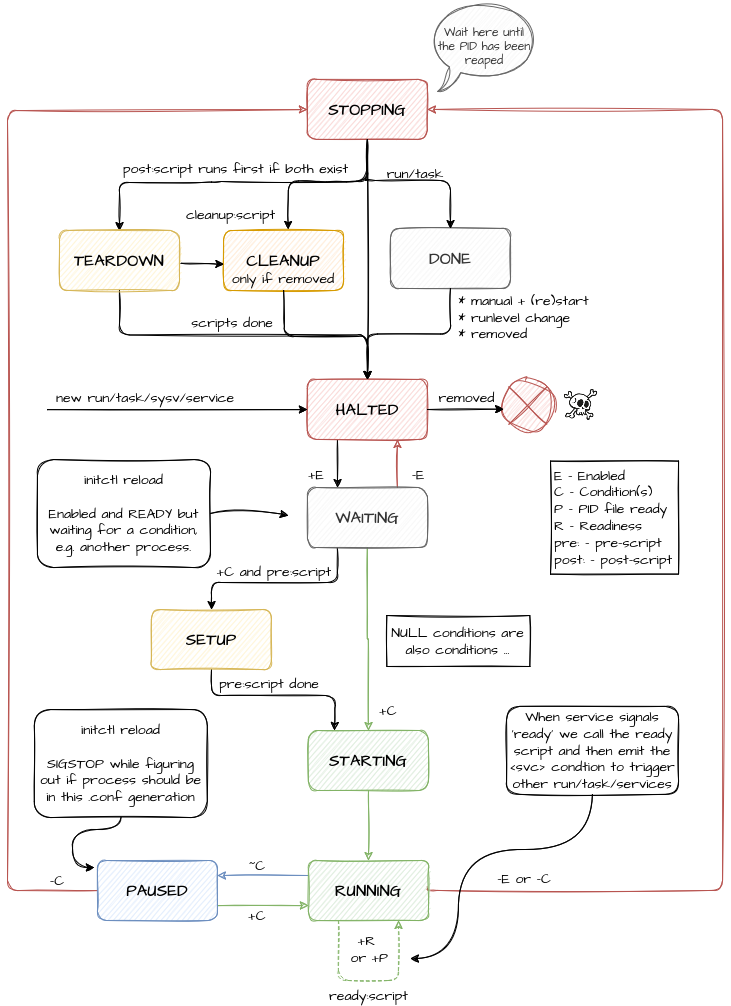
When a reconfiguration is requested, Finit transitions all conditions to
the flux state. As a result, services that depend on a condition are
sent SIGSTOP. Once the new state of the condition is asserted, the
service receives SIGCONT. If the condition is no longer satisfied the
service will then be stopped, otherwise no further action is taken.
This STOP/CONT handling minimizes the number of unnecessary service
restarts that would otherwise occur because a depending service was sent
SIGHUP for example.
Services with the ~ prefix are an exception to this rule: when their
conditions return to on after being in flux, the reload is propagated
-- the service is reloaded (SIGHUP), or restarted if it has
reload-signal = "none", instead of simply being resumed.
Therefore, any plugin that supplies Finit with conditions must ensure
that their state is updated after each reconfiguration. This can be
done by binding to the HOOK_SVC_RECONF hook. For an example of how
to do this, see plugins/pidfile.c.